

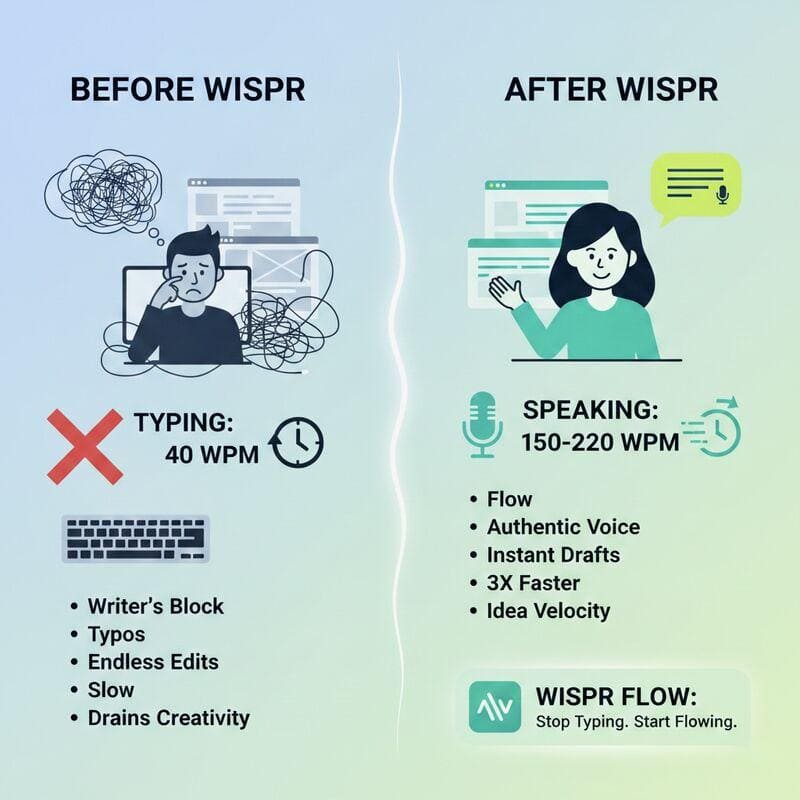








Typing on a computer keyboard can be time-consuming, particularly for journalists, writers, students and professionals who regularly produce large amounts of written content. While typing skills can improve with practice, speaking is naturally much faster for many people. AI-powered voice-dictation tools are now attempting to turn that advantage into a practical writing workflow.
One such tool is Wispr Flow, an AI-powered voice-to-text application that allows users to speak naturally and have their words converted into text directly inside applications and websites. The company currently describes Flow as capable of making voice-based writing around four times faster than conventional typing.
What Is Wispr Flow?
Wispr Flow is a voice-dictation application designed to let users write by speaking instead of typing. It runs in the background and can be activated when users want to dictate text. The spoken content is then converted into text and inserted into the text field of the application being used.
Unlike traditional speech-to-text systems that simply transcribe every spoken word, Flow uses AI to clean up the output. It can remove filler words, add punctuation, format lists and understand corrections made while speaking. For example, a user can say something such as, “Let’s meet at 2, actually 3,” and Flow can understand the correction and produce the intended sentence.
How Does Wispr Flow Work?
After installing the application, users sign in and provide the required permissions, including microphone access. The official setup guide says that most users can complete the initial setup in about five minutes. Users can then configure their preferred language and keyboard shortcut.
On desktop computers, Flow operates through its Flow Bar and hotkey. Users activate the tool, speak naturally and allow the software to convert their speech into text. The application can work in virtually any text field, including email, documents, messaging platforms and other web applications.

wispr-flow dashboard
Wispr Flow Works Across Multiple Devices
Wispr Flow is currently available on Mac, Windows, iPhone and Android. The company says the application is designed to work across desktop and mobile devices while keeping the user’s voice workflow synchronized.
On Mac, the software requires macOS 12 or later, while users also need microphone access and accessibility permissions for Flow to type text into applications.
More Than Just Speech-to-Text
One of Wispr Flow’s main differences from conventional dictation tools is its AI-powered editing capability. The software can automatically remove filler words such as “um” and “uh,” recognize punctuation, format numbered lists and clean up spoken sentences. It can also understand when users change their thoughts during dictation.
This means users do not necessarily have to speak in perfectly written sentences. They can explain an idea naturally and allow the AI to turn the speech into cleaner written content. For journalists, content creators and office workers, this can reduce the time spent switching between typing, editing and formatting.
Custom Dictionary and Snippets
Wispr Flow includes Dictionary and Snippets features that allow users to personalize the software. The custom dictionary can learn uncommon names, technical terminology, industry-specific words and unusual spellings. Users can also manually add words to the dictionary.
The Snippets feature works as a voice shortcut. Users can create frequently used blocks of text and trigger them by speaking a specific phrase. This can be useful for email addresses, introductions, frequently used responses, links and other repetitive content. For example, instead of repeatedly typing an email introduction, a user can create a snippet and activate it with a short spoken command.
AI Transform Features
Wispr Flow also goes beyond basic dictation through AI-powered commands. Users can ask Flow to change or improve text using natural-language instructions. A piece of dictated text can be made more professional, concise or suitable for a particular context. The official documentation describes Flow as being able to run AI commands such as asking it to make text more professional or summarize content.
This makes the application more like an AI writing assistant combined with a voice-input system rather than simply a digital dictation recorder.
More Than 100 Languages
Wispr Flow supports more than 100 languages, according to the company’s current feature information. This includes languages such as Hindi, Chinese, Korean and Arabic, alongside English and many others. The multilingual capability is particularly relevant for users who regularly work in more than one language. The company has also introduced tools that make switching between languages easier during workflows.
For Nepali users, support for Nepali makes the tool potentially useful for writing articles, notes, emails and other content through voice.
Wispr Flow for Journalists and Content Writers
For journalists, the biggest advantage of a voice-dictation system is speed. A journalist can speak the initial structure of an article rather than typing every sentence manually. The AI can then clean up the dictated content, add punctuation and remove unnecessary filler words. It can also be useful when preparing interview notes, social media captions, emails, research notes and article drafts.
However, AI-generated dictation should not be treated as a replacement for human editing. Names, figures, quotations, locations and technical terms should still be checked before publication.
Wispr Notetaker Takes the Tool Beyond Typing
Wispr Flow has also expanded into AI-powered meeting transcription through Wispr Notetaker. Recent reporting from WIRED says the Notetaker can record and transcribe meetings in real time, generate AI summaries and allow users to ask questions about the recorded conversation. It can also connect with a user’s calendar to participate in meetings automatically.
The feature represents a significant shift for Wispr Flow, taking the company beyond voice typing and into the increasingly competitive AI meeting-notetaker market, alongside products such as Otter.ai and Granola. According to WIRED, the Notetaker was initially available on Mac, with Windows expansion planned.
Wispr Flow Pricing
Wispr Flow operates under a freemium model. According to its current official pricing page, the Flow Basic plan is free. It currently includes 2,000 words per week on Mac and Windows and 1,000 words per week on iPhone, while Android has unlimited words per week on a limited-time basis. The free plan also includes features such as custom dictionaries, snippets, support for more than 100 languages and Privacy Mode. The current Flow Pro plan is listed at $15 per user per month. It provides unlimited dictation across supported devices, AI commands, priority support, early access to features and team collaboration capabilities.
New users receive a 14-day Pro trial before moving to the Basic plan if they do not upgrade.
The Future of Voice-Based Computing
Wispr Flow reflects a broader shift in how people interact with computers. Instead of treating the keyboard as the primary method for entering information, AI tools are increasingly allowing users to speak naturally and let software handle transcription, formatting and editing.
The development of AI meeting notetakers also shows how voice-based computing is moving beyond simple dictation. Applications are increasingly expected not only to record what people say, but also to organize, summarize and make that information searchable.

Nepaliict
- Nepal’s Road to 5G: 7 Powerful Milestones for Faster Nationwide Connectivity by 2035
- Wispr Flow: Revolutionary AI Tool Makes Writing Up to 4 Times Faster
- NAIMA Nepal Mobility Expo 2026: Stall Allocation Completed for Nepal’s Biggest Auto Show
- Lost in Mandala: 5 Reasons Nepal’s New Animated Film Matters
- 6 Breakthrough Technologies That Will Revolutionize Power Electronics technologies in the Coming Years







Comments